Activity Log
Activity Log
The Activity Log is a complete audit trail of events in the active workspace. It merges actions taken in the Admin Center, such as member changes and workspace updates, with actions taken inside the VSEC engineering platform, such as sign-ins, test runs, and asset and risk changes.
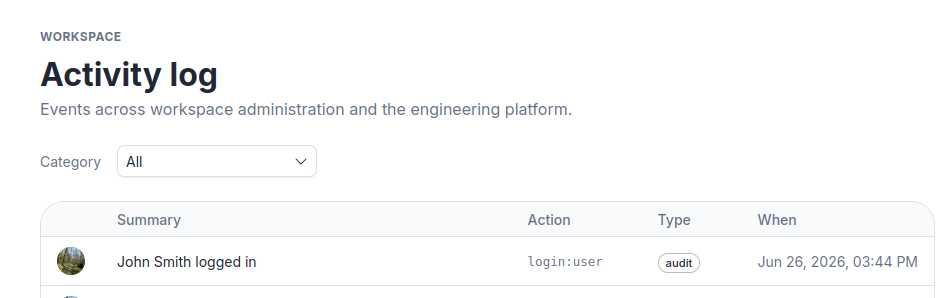
Filtering by Category
Use the Category dropdown at the top of the page to narrow the log:
| Category | Shows |
|---|---|
| All | Every event from both the Admin Center and the engineering platform, merged chronologically. |
| Workspace | Admin Center events only, such as member changes and workspace edits. Workspace owners and admins see everyone’s actions; other members see only their own. |
| Authentication, Test Bench, Assets, Risks | Events from a specific area of the VSEC engineering platform. |
Reading the Log
Each row in the table shows:
| Column | Description |
|---|---|
| Actor | The user who triggered the event. Hover over their avatar for their full name. System events show a gear icon. |
| Summary | A human-readable description of what happened. |
| Action | The machine-readable event code in the form action:resource, e.g. test-run-finish:bench. |
| Type | The kind of event: activity for user-driven events, system for automated ones, and audit or external for other recorded events. |
| When | Date and time of the event. |
The log displays 50 entries per page. Use the pagination controls at the bottom to navigate older entries.
Viewing Event Details
Click any row to open the detail drawer on the right side of the screen.
The drawer shows the full event record:
- Summary and event type.
- The specific resource affected, with its reference ID where available.
- Source: either Workspace admin (Admin Center) or Engineering platform (VSEC Test, Asset Manager and Risk Manager).
- The actor: name and avatar, or “System” for automated events.
- A Metadata table with additional structured data about the event. The fields shown vary by event type.
Last updated on